• Website Builders
  • WP Themes
  • WP Plugins
  • Hosting
  • Resources
  • Deals
  • More
    • Recommend WP Themes
    • Recommend HTML Theme
Featured Web Templates
  • Real Estate HTML Templates
    Best Real Estate HTML Templates for Property Listing Websites 2025
    • December 4, 2025
  • Comparing Resido and RentUP
    Resido vs. RentUP: Which Real Estate HTML Template is Right for You?
    • June 11, 2024
  • jobstock-workscout
    Job Stock vs. WorkScout: Which Job Board HTML Theme is Right for You?
    • June 8, 2024
Recommended #1 WP Theme
TheLargestLibraryofPre-BuiltWebsites-1200x1200
  • Freebies
  • Plugins
  • Resources
  • Templates
  • Tutorials
  • UI/UX
  • Compare
  • Website Builders
  • WP Themes
  • WP Plugins
  • Hosting
  • Resources
  • Deals
  • More
    • Recommend WP Themes
    • Recommend HTML Theme
Razorpay Setup
  • Plugins
  • Tutorials

How to Set Up Razorpay in WooCommerce: Step-by-Step Guide for Indian Payments

  • December 2, 2025
  • 4 minute read
  • Shaurya Preet
Total
0
Shares
0
0
0

Introduction: Razorpay

Our world is digitalizing, and so is business. Therefore, a businessman always
needs a secure, quick and smooth payment experience for their online
transactions. That’s what Razorpay, India’s biggest payment gateway, does.

Whether you are running a startup brand or operating a big online business, it
is the most trusted platform for WooCommerce payment integration.

Moreover, it supports all kinds of online payment methods including UPI, Net
Banking, Cards, etc.

Above all, this article will let you know about the complete Razorpay setup
for WooCommerce
.

Let’s accept online payments in minutes…!

What is Razorpay? Understand Why You Should Use it
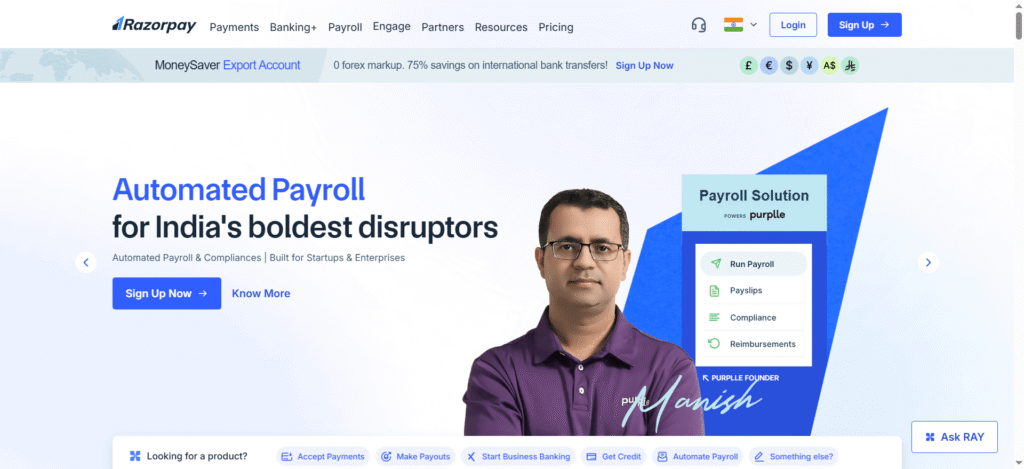
Razorpay – Best Payment Solution

It is one of the most trusted payment gateways in the world designed to
make digital transactions simpler for businesses. Furthermore, you can
easily integrate it with WooCommerce, the best WordPress eCommerce
plugin.

Therefore, after its integration, you can directly (and safely) manage your
transactions via your website.

Why is it so? These are the reasons:

  • Various Payment Options: Use UPI, wallets, Credit or Debit cards, and
    other options.
  • Perfectly for Suited for Indian Businesses: The design has been
    Indianized to support our currency and regulations.
  • Top-notch Security: PCI DSS Level 1 security features with double-factor authentication.
  • Quick Payment Settlements: Get payments instantly to your business
    bank account. No delays, no worries…!
  • Amazing Dashboard: You can easily track your previous transactions.
    payments, and refunds.
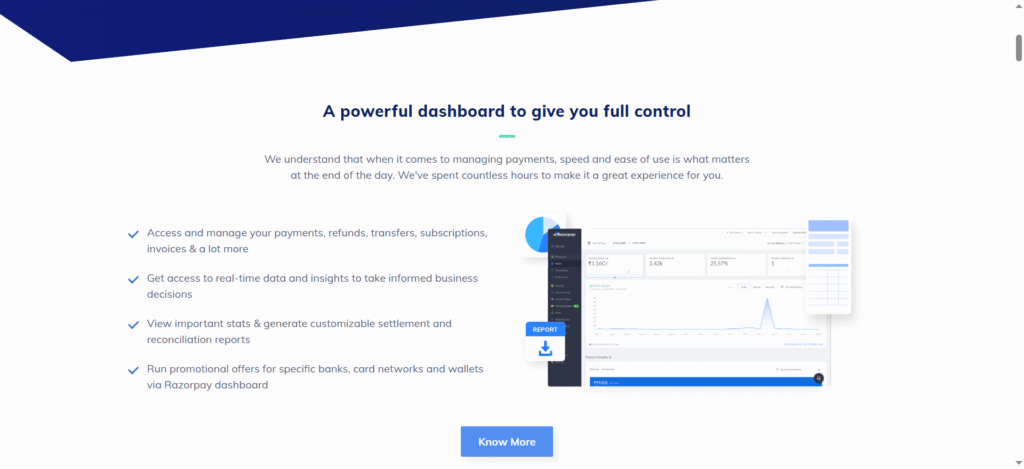
Razorpay Advance features

Want to Begin Razorpay Integration? Check out What You Need

Razorpay Auth

To start its integration with WooCommerce, these are the things you need to
have:

  • Firstly, a WordPress website with installed (and configured)
    WooCommerce plugin.
  • 1 Razorpay business account. You can easily create it for free. Visit
    razorpay.com and make one.
  • Your Key Secret and API Key ID. You will get both on your Razorpay
    dashboard (after creating your account)
  • Lastly, a basic knowledge of your website settings is important.

How to Integrate Razorpay with WooCommerce? Find the
Complete Guide

It’s time to begin your integration. Let’s find the complete procedure in easy
steps:

Step 1: Install the Razorpay Plugin in Your WordPress
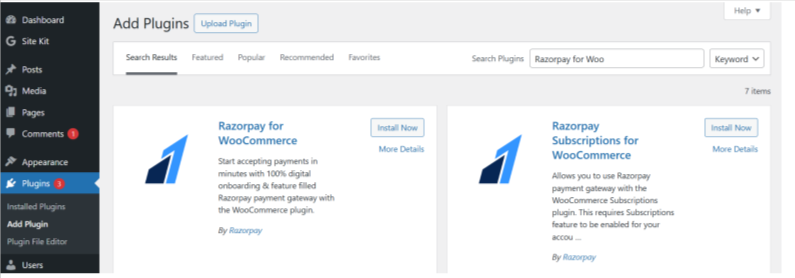
Install Razorpay
  • Go to your website dashboard.
  • Click on Plugins and select Add New.
  • Type “Razorpay” for WooCommerce in the search tab. The plugin will
    appear.
  • Select Install Now and activate it.

Step 2: Adjust Razorpay Settings

  • Go to WooCommerce, then click on Settings and select Payments.
  • There, you will find various payment options including “Razorpay.”
    Activate it.
  • You will see the Manage option. Click and open its setup page.

Step 3: Integrate API Keys

  • Go to your Razorpay Dashboard, click on Settings and find API Keys in
    it.
  • Select Generate Live Key. You can also generate a Test Key for the
    demo.
  • You will see the Key ID and Key Secret. Copy and paste them in the
  • settings of WooCommerce Razorpay.

Step 4: Optional Settings for a Test Mode

Want to test it before the real integration? Here’s how you can do it:

  • Go to the settings of Razorpay WooCommerce and click on the Enable
    Test Mode
    .
  • Verify it by completing a few transactions to test if everything is going
    well or not.
  • After testing, deactivate “Test Mode” to start receiving real payments.

Now save your settings by clicking on Save Changes. Your integration will
complete, and Razorpay will start appearing on your checkout page.

Test Your Integration Before Launching: Here’s How You Can Do
It

Before launching your business online, it’s better to test the working of this
integration. For this, you need to:

  • Place a dummy order on your website.
  • During checkout, select Razorpay as your mode of payment.
  • Use the details of the test card. (You will get this for sandbox mode.)
  • If your payment gets processed, verify it by confirming WooCommerce
    orders and details on the Razorpay dashboard.
  • If you see “Payment Successful” then your integration has been done
    correctly.

Some Amazing Features of Razorpay You Can Use to Grow Your
Online Business
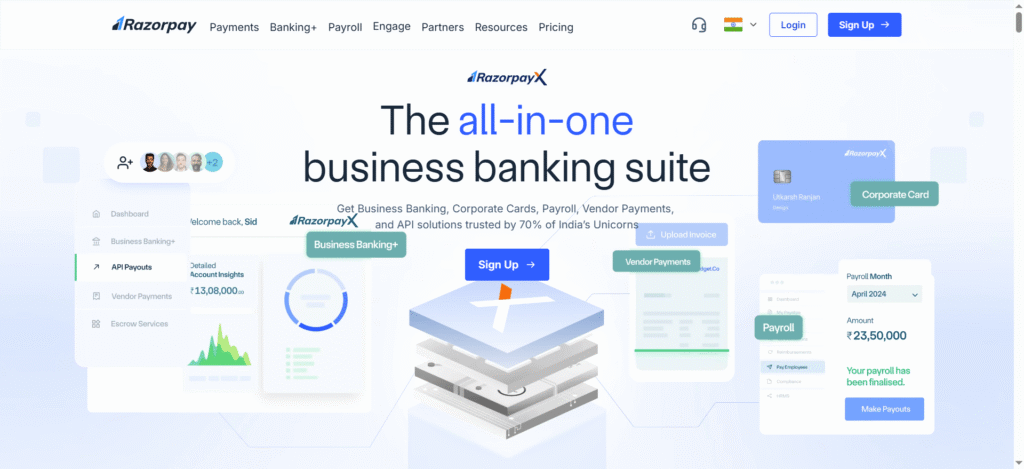
All in one banking platform
  • Smart Payment Options: Ease your checkout with dynamic payment
    options.
  • Subscription Feature: Best feature if your website is based on
    membership and needs regular renewals.
  • Pay Later Option: You can provide your customers with the facility to
    Pay in parts.
  • Refund Management: Manage refunds easily with the help of
    WooCommerce integration.
  • Instant Settlements: Quick fund settlements with better and easy
    access.

How to Troubleshoot Some Common Razorpay Setup Issues?

There might be some issues you can face during this process. Let’s find what
can be these issues and ways to fix them:

  • Payment Not Visible at Checkout: Check that “Razorpay” is enabled. Click
    WooCommerce and select Payments to check.
  • Invalid API Key: Check your API key. Do not consider “Test Keys” as
    Live Keys.
  • Failed Transaction: Go to payment setting in the plugin and check
    whether the payment capture setting is automatic or not.

Pro Tips for Maximum Conversions: 5 Tips to Optimize Razorpay
Integration

  • Show Your Users that You Accept Multiple Payment Methods
    Display all the payment methods clearly on your payment page during
    customer checkout.
  • Provide Discounts on a Particular Payment Method Like UPI
    Customers love discounts on payment methods they use maximum. Try
    to take its advantage.
  • Utilize Abandoned Cart Emails
    Email customers who didn’t buy something due to payment gateway
    failure.
  • Keep Your Payment Page User-Friendly
    Users want a clear and easy payment page. Keep it that way.
  • Display Security Badge
    Show “Powered by Razorpay” clearly on the payment page. It will
    enhance buyers’ confidence on your website, and you will get more
    repeat customers

Final Thoughts: Razorpay, One Solution to Simplify Your
Payments

Ecommerce-Payment-gateway

Indian e-commerce is growing as people are continuously shifting to online
shopping. In such times, if you run an e-commerce business, then a smooth
The payment process should be your priority. Razorpay Integration with
WooCommerce will do exactly that. You will get the best for your business as
It is safe, engaging, and user-friendly for all types of entrepreneurs.

Therefore, whether you are operating an online marketplace, or a digital
institute, this integration will ensure that your payment system will be quick,
secure, and effortless
.

Let’s begin with it and experience the change with growing revenue.

Total
0
Shares
Share 0
Tweet 0
Pin it 0
Shaurya Preet

Hey, I am Shaurya Preet. CEO & Founder of Themez Hub. I am frequently researching the latest trends in digital design and new-age Internet ideas.

Previous Article
Astra vs Elementor
  • Website Builders

Astra vs Elementor: The Ultimate Comparison for WordPress Users

  • November 29, 2025
  • Shaurya Preet
View Post
Next Article
Real Estate HTML Templates
  • Templates

Best Real Estate HTML Templates for Property Listing Websites 2025

  • December 4, 2025
  • Shaurya Preet
View Post
You May Also Like
woocommerce payment gateway
View Post
  • Plugins

Top 7 Best Payment Gateway Plugins for WooCommerce in 2025

  • Shaurya Preet
  • November 14, 2025
Build directory website
View Post
  • Tutorials

How to Create a Listing Directory Website in WordPress (Step-by-Step Guide)?

  • Shaurya Preet
  • October 27, 2025
Woocommerce Addon
View Post
  • Plugins

Best WooCommerce Plugins for Paint, Coatings & Finishing Products

  • Shaurya Preet
  • October 19, 2025
Best Contact Form WP Plugins
View Post
  • Plugins

7 Best Contact Form Plugins for WordPress (Free & Paid)

  • Shaurya Preet
  • October 6, 2025
Figma & Adobe XD Plugins
View Post
  • Plugins
  • Web Design

Best Figma & Adobe XD Plugins for Faster Design Workflow

  • Shaurya Preet
  • June 21, 2025
WooCommerce PDF Invoice and Shipping Documents Plugins
View Post
  • Articles
  • Plugins
  • WordPress

12 Best WooCommerce PDF Invoice and Shipping Documents Plugins

  • Shaurya Preet
  • February 5, 2024
Top WordPress Security Tips
View Post
  • Articles
  • Plugins
  • WordPress

WordPress Security in 2024: The Essential Checklist for Zero Breaches

  • Shaurya Preet
  • January 31, 2024
cms-platform
View Post
  • Articles
  • Plugins

Top 10 Most Popular CMS Platform For Website Development

  • Shaurya Preet
  • November 4, 2023
Read What’s Trending Now
  • Best WordPress Themes – Expert Picks
    Best WordPress Themes – Expert Picks
    • December 22, 2025
  • Divi Review 2026
    Divi Theme Review 2026: Is It Still the Best Visual Builder for WordPress?
    • December 18, 2025
  • Full-Stack Development Tools
    Best Essential Full-Stack Development Tools and Resources in 2025
    • December 15, 2025
  • Project Management Tools 2025
    Best Project Management Tools for Designers & Developers in 2025
    • December 12, 2025
Don’t Miss These Picks
  • Best WordPress Themes – Expert Picks
    Best WordPress Themes – Expert Picks
    • December 22, 2025
    • 7 minute read
  • Divi Review 2026
    Divi Theme Review 2026: Is It Still the Best Visual Builder for WordPress?
    • December 18, 2025
    • 6 minute read
  • Divi free Vs Divi Pro
    Divi vs. Divi Pro: Which One Is Better for WordPress Agencies in 2025?
    • December 9, 2025
    • 5 minute read
  • wpresidence and houzez review
    The Ultimate Real Estate Theme Face-Off: WPResidence vs Houzez
    • November 25, 2025
    • 5 minute read

Subscribe

Subscribe now to our newsletter

ThemezHub
© 2025 Themezhub. All Rights Reserved.

This site is not affiliated with the WordPress® Foundation. WordPress® is a registered trademark of the WordPress Foundation.

Social Links
Likes
Followers
Followers
Followers
Followers
Followers
Popular Collections
  • 10 Best Website Color Scheme Generator
  • 10+ Best Resources for Free Photoshop
  • Best Project Management Tools for Designers
  • 10 Websites For Free & Premium Icons
  • 15+ Best Responsive Email Frameworks
  • 15+ Mobile App Builders Tools
Our Recommended WP Themes
  • Best Directory & Listing WP Themes
  • Best Multipurpose WordPress Themes
  • 5 Most Powerful Job Boards WordPress Themes
  • 5 Stunning Real Estate WordPress Themes
  • 10 Best Divi Plugins 2025
  • Why Elementor is the #1 WP Page Builder
  • Write For Us
  • About Us
  • Advertise
  • Say Hi
  • Privacy

Input your search keywords and press Enter.

Manage Consent

We use cookies to ensure you get the best experience on our website. View our privacy policy.

Functional Always active
The technical storage or access is strictly necessary for the legitimate purpose of enabling the use of a specific service explicitly requested by the subscriber or user, or for the sole purpose of carrying out the transmission of a communication over an electronic communications network.
Preferences
The technical storage or access is necessary for the legitimate purpose of storing preferences that are not requested by the subscriber or user.
Statistics
The technical storage or access that is used exclusively for statistical purposes. The technical storage or access that is used exclusively for anonymous statistical purposes. Without a subpoena, voluntary compliance on the part of your Internet Service Provider, or additional records from a third party, information stored or retrieved for this purpose alone cannot usually be used to identify you.
Marketing
The technical storage or access is required to create user profiles to send advertising, or to track the user on a website or across several websites for similar marketing purposes.
  • Manage options
  • Manage services
  • Manage {vendor_count} vendors
  • Read more about these purposes
View preferences
  • {title}
  • {title}
  • {title}