Nowadays, the online world has undergone significant transformations in how stores function. Many single-store businesses aspire to become bigger without hiring extra staff. Your site can combine multiple sellers to sell their products at the same time. This concept allows the owners to receive a commission from the sales of other shops. Buyers accustomed to the modern style of shopping are most likely to prefer this approach, as they have the opportunity to find all they want under one roof.
Multi-vendor marketplace The WordPress solution is praised in many cases. Your main store can keep a part of the profits generated by other vendors without having to buy and stock any item. The sellers are completely responsible for the shipping and product details. In this way, the risk is lowered while the brand can still reach more people. Most shop owners say that they feel more comfortable using this model compared to the traditional ones.
Multi-vendor marketplace WordPress: Complete Guide
Here is a step-by-step guide:
Step 1: Choose the Right Domain Name
Before picking hosting, you need a domain name people can trust and remember. Keep it short, easy to spell, and relevant to what you’re selling. If your ideal .com is taken, extensions like .store or .shop work great for e-commerce. You can register your domain through your hosting provider or a separate registrar. Once you’ve locked in a name, move on to setting up your hosting.
Step 2: Set Up WordPress and Hosting
The first step to your marketplace success is choosing the right hosting plan. Make your choice among the ones that have high-speed ratings and great uptime records. Today, you can even install WordPress with just one click through most hosting companies.
You’ll typically choose between shared, VPS, cloud, or managed WordPress hosting. Shared hosting is cheap and fine for testing things out, but it can slow down once your traffic grows. VPS hosting and cloud hosting offer more dedicated resources for a growing marketplace.
For a marketplace, though, managed WordPress hosting is usually worth it. It handles updates, backups, caching, and security for you, so you’re not fixing things at the last minute. Many plans also include staging sites to test changes safely.
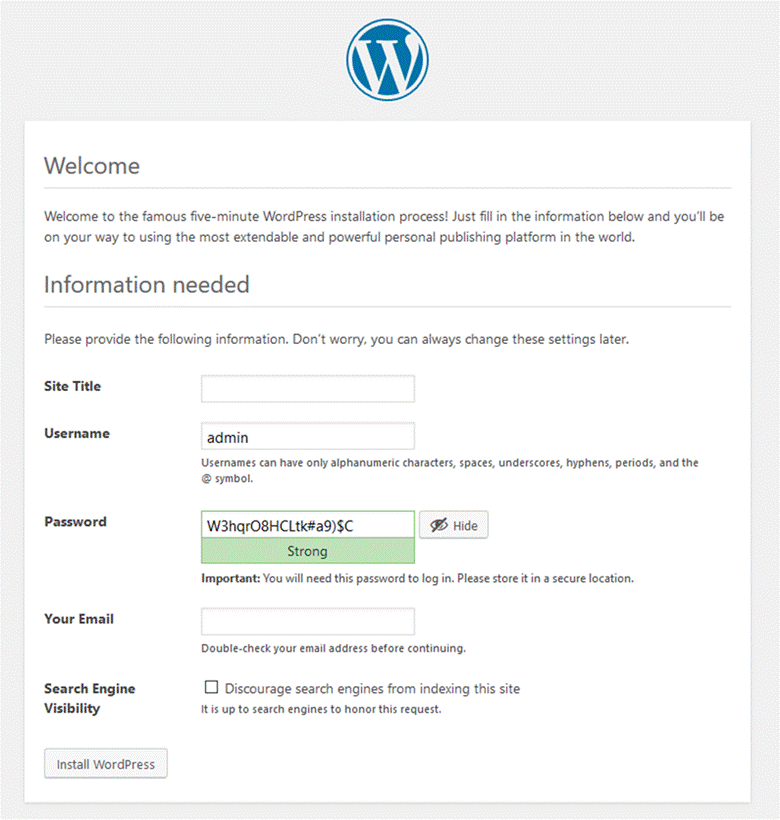
WordPress is the fundamental part of your entire marketplace system. Security setups are a must after WordPress installation. You complete the groundwork that supports all the features of the market you will be installing later. Many beginners have this stage done in less than an hour.
- Select a plan with SSD and good ratings as the first step
- Perform WordPress installation with a one-click installer in your hosting panel
- The next point is to set your site title and description in Settings → General
- Get an SSL certificate → use the free Let’s Encrypt option
- Download Wordfence or the other security plugin → the one that secures your marketplace from attacks
- Automated backups → let your copy of the site data be under continuous protection
Step 3: Install and Configure WoodMart Theme
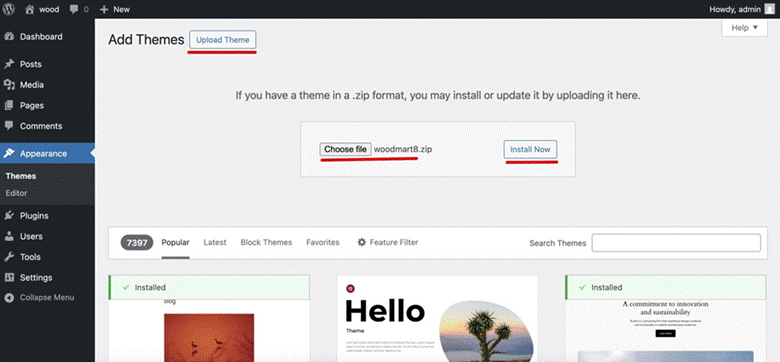
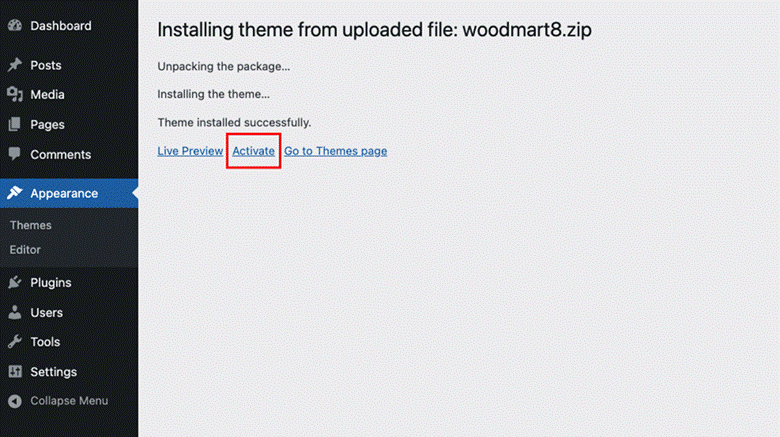
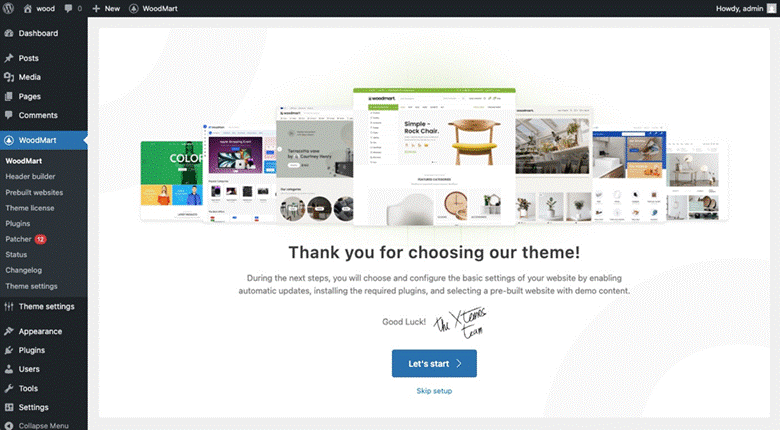
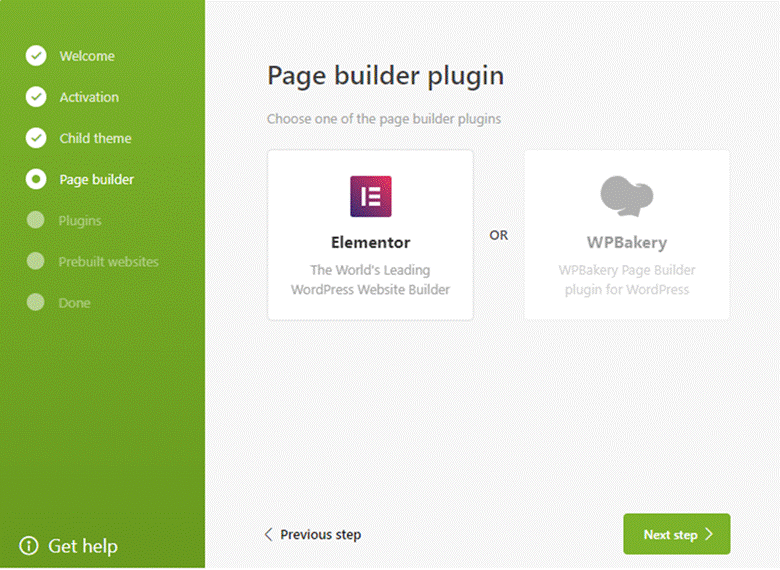
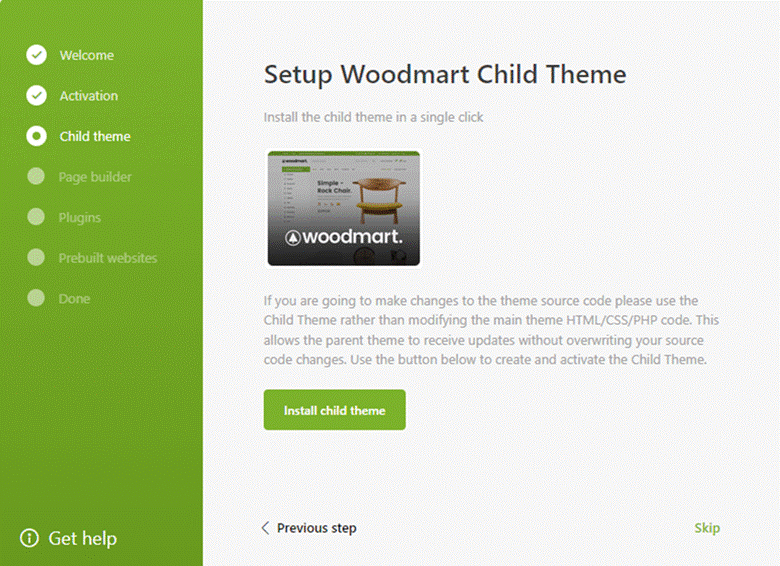
The WoodMart theme marketplace website is installed through your dashboard. First, go to Appearance → Themes → Add New → Upload. After completing the activation, the setup wizard is proposed to attend to the basics.
WoodMart presents the customers with some already designed projects that can be imported straight away. These designs allow you not to spend numerous hours on your manual setup work. Changing colors and layouts through the theme settings panel is also effortless. The majority of store owners complete the basic theme setup in about two hours.
- Obtain WoodMart from ThemeForest and save the zip file to your device as step one
- The next move would be to upload this file via Appearance → Themes → Add New → Upload
- Activate WoodMart and provide your license key when asked
- Select a demo layout→ As for vendors, the Marketplace demo is the most suitable one
Register your logo, colors, and fonts on the WoodMart Options panel
Step 4: Install the Dokan Plugin
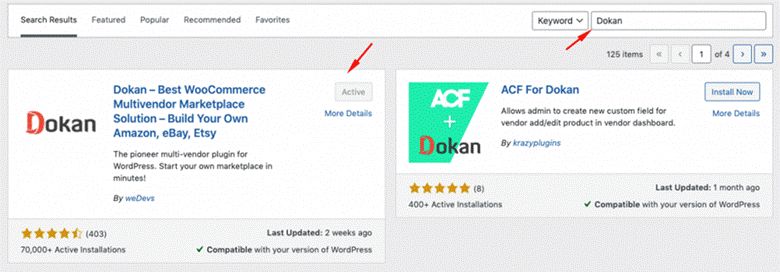
The Dokan marketplace tutorial steps the WordPress plugin server alongside the Dokan file download. Move along to Plugins → Add New, key in Dokan, and get the free version for the essential needs and Pro for extended functionalities.
Now outline the commission rates and money flow. The majority of marketplaces opt first for the model where the commission is set at 10% of the sales made.
- Head to Plugins → Add New, type Dokan in the search box, pick the right version, and install it
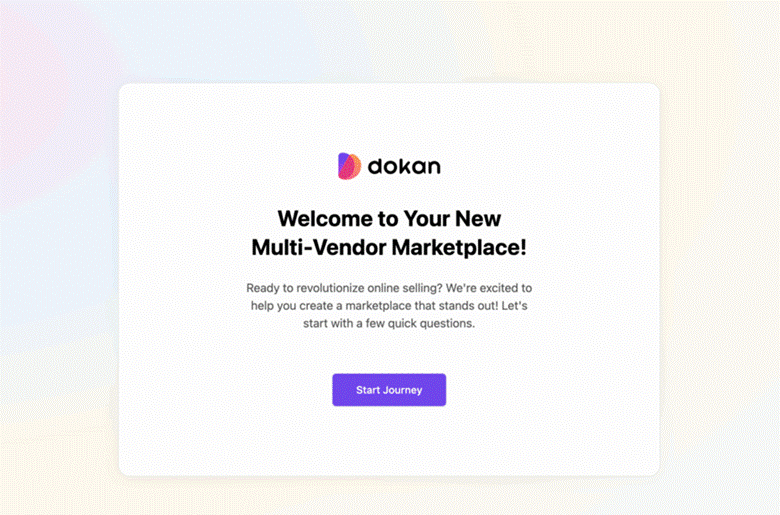
- Let the wizard generate the necessary pages for your marketplace
- Commission rates → decide whether it is going to be a flat rate or a percentage of the sales
- Connect payment methods like PayPal and Stripe to vendors
- Select shipping and tax-related vendor settings as the last step
Step 5: Link Dokan with WoodMart Layout
The Dokan WoodMart merge is an action that most times does not require the user to intervene manually. The first thing to do is to confirm that both are at their newest versions. Such compatibility ensures that the stores of vendors are in line with the design of your main site.
The design of your marketplace should be styled the same way in all the vendor shops. Find out how the product pages look when you add the WoodMart elements. The shopping process should be easy and pleasant as customers move from one vendor to another. Most of the theme options panel can be used to fix the problems with the setup.
- Use Appearance → WoodMart Settings → General to check compatibility
- Now the vendor store headers can be customized in Dokan → Settings → Appearance
- Change product grid layouts → the fact that they correspond to your main store style
- Don’t forget to check all pages on mobiles to be sure of a responsive design
- Most importantly, try to do the whole checkout transaction with the products from different vendors
Step 6: Configure Vendor Registration
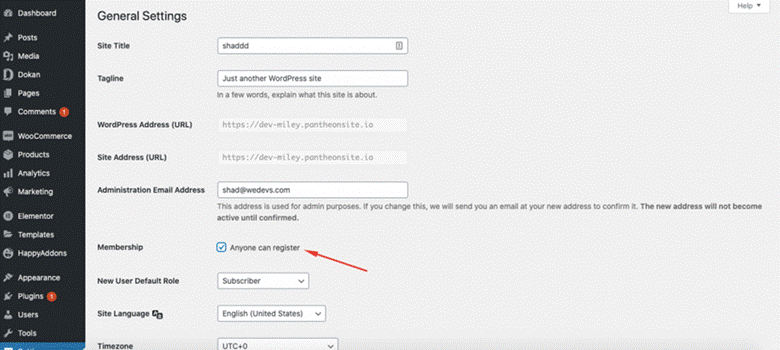
Develop a registration form to gather the complete seller information. The form can inquire about the business without being overwhelming. Numerous thriving marketplaces initially concentrate on a handful of sterling vendors. The Create marketplace, like the Amazon WordPress expedition, is propelled just by the right seller selection.
- First, by clicking on Dokan → Settings → Vendor Registration, you will be able to change the form.
- Next, if there is more information your vendors might need to fill out, add some custom fields for that.
- Afterwards, choose between a manual and an automatic vendor approval system.
- Develop the seller guidelines —> list the allowed products, such as housewares only.
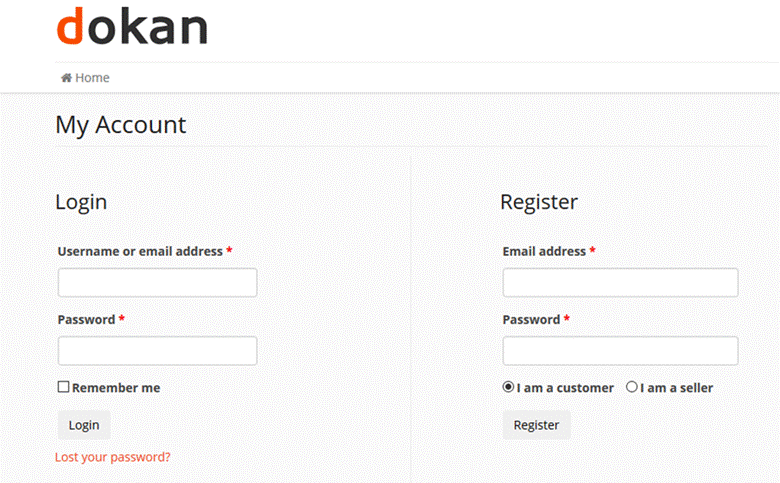
- Assign the default vendor store visibility and product limits.
- At last, perform the registration by a new vendor and see if everything works well.
Step 7: Set Up Payment Gateways and Commissions
Most marketplace owners initially struggle with payment setup and, surprisingly, call it complicated. You are in need of systems that receive the customers’ payments and, at the same time, send the money out to the vendors. The bright side of this is that Dokan is compatible with the majority of the most used payment methods. Don’t rush through this stage—if your trading becomes difficult, the whole market will crash.
The commission structure not only affects your profit but also vendor interest. If it is set too high, vendors will refrain from signing up; if it is set too low, then you will hardly be able to cover your expenses. Most marketplaces have their commissions starting from 10-15%, then moving according to results. It is good to remember that payment processors also charge fees for themselves.
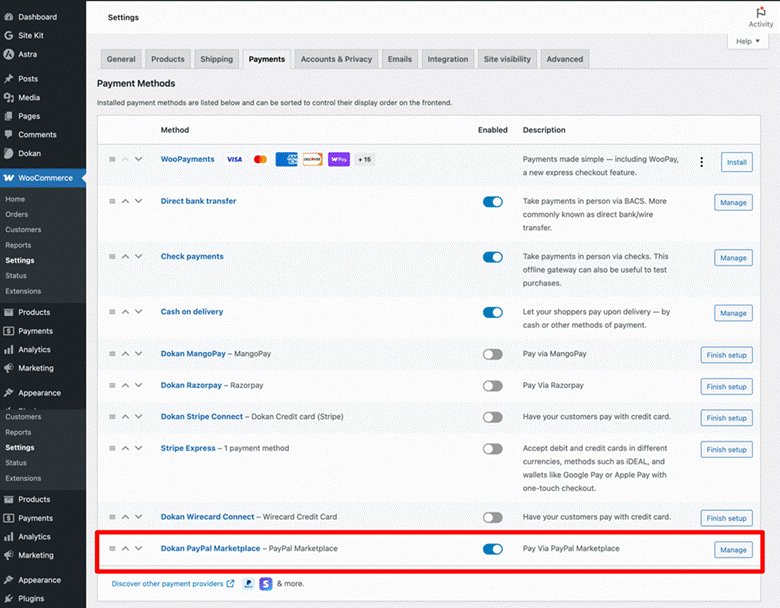
- First, navigate to Dokan → Settings → Payment Methods
- Just to be sure, add two payment methods at a minimum —> PayPal and Stripe are convenient choices
- Organize your commission plan in conjunction with product categories
- Confirm every payment gateway’s functionality —> use the sandbox mode for simulations without real transactions
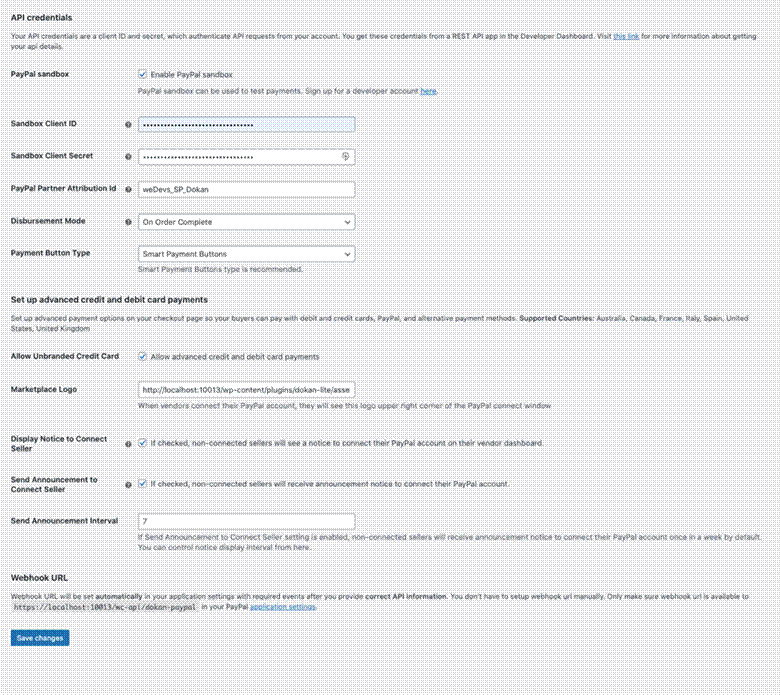
- Let the vendors know when they will receive the payments by creating a payout schedule that they understand
Run through the test orders to make sure that all the fees are calculated correctly
Step 8: Optimize Product Listings and Search
WooCommerce multi-vendor system has to implement strong search tools to function properly. Customers are likely to get annoyed if they can’t quickly locate the products they want. The WoodMart theme comes with some excellent search options that you should activate.
The way your product listing is organized has a big impact on the sales made. Before taking your site public, try different grid layouts and various image sizes. A lot of flourishing marketplaces create their own standards for how products should be displayed and provide sellers with the necessary templates. Such uniformity makes it easier for shoppers to do a comparison without any hassle.
- First, in WoodMart → Settings → Shop, you can change product grids.
- Turning on AJAX search, —> gives users a dynamic preview of the search results as they input text in the search box.
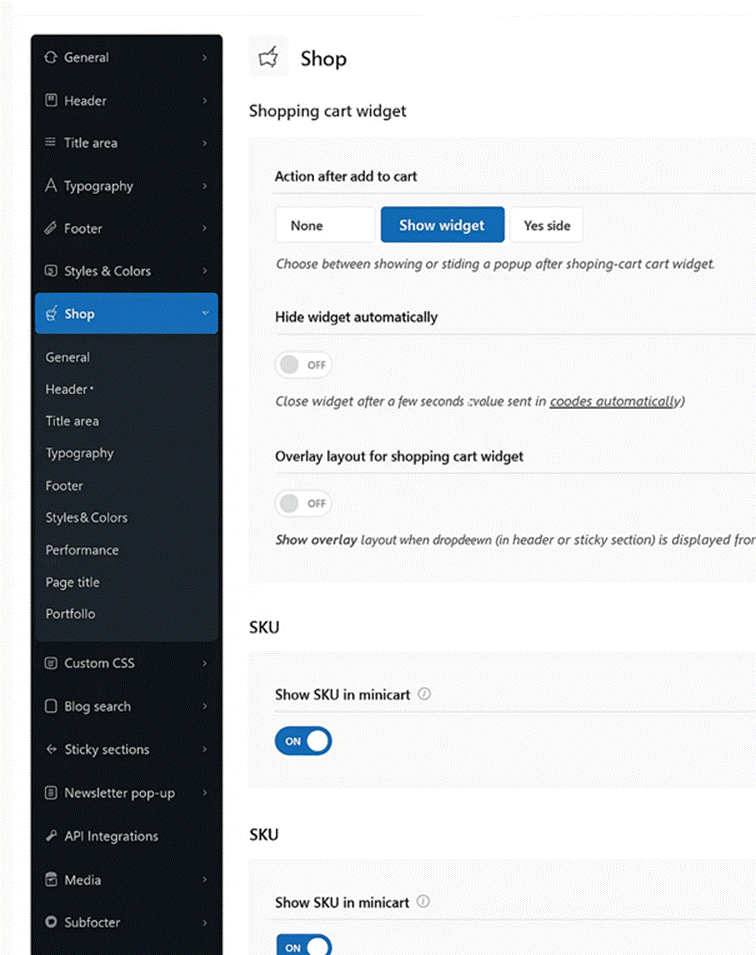
- Let products be filtered by price and feature through setup.
- Generate a uniform product template —> use this for vendor collaboration.
- Teach vendors the proper use of tags and categories.
- Provide product vendors with the option to mass import.
- The Dokan tutorial covers advanced search settings that greatly increase sales, as the need for products is met through a highly efficient marketplace search.
Conclusion
Multi-Store Marketplace The WordPress Management option scales commensurately with the number of developed stores. One can start small with the platform and then add more modules or functions as needed. The core instruments perform the fundamental trades with clear seller dashboards. Each seller is permitted access to their own stock only, whilst the administrator gets to see everything. Numerous marketplaces usually start bare-bones in terms of functionality and then expand to offer more features. This business model of growth allows them to maintain low-cost operations during the early stages of trade.