Is WP Engine Still the King in 2026?
The managed WordPress hosting landscape has grown significantly more competitive since WP Engine first staked its claim as the premium standard. Kinsta has matured, Cloudways has become more capable, and even Pressable, WP Engine’s own budget sibling, competes on price. So the question deserves an honest answer: is WP Engine still worth it in 2026?
For a web design agency billing $150–$400/month per client in managed retainers — yes, unambiguously. For a solo blogger running a personal site on a tight budget, no, and WP Engine would tell you the same.
WP Engine’s value proposition has never been about raw feature count. It is about operational certainty: the confidence that a high-traffic WordPress site will load fast, stay online during a viral moment or a Black Friday surge, recover instantly from a botched update, and have an expert on the line at 2 AM when something breaks. In 2026, that proposition remains largely unchallenged at scale.
For Agency Owners: WP Engine is not a hosting cost. It is an insurance policy, a dev-ops team, and a performance SLA rolled into one monthly invoice. When a client’s site generates $30,000/hour during a product launch, the difference between a $30/month shared server and a $115/month WP Engine plan is not debatable.
Uptime SLA
Uptime SLA👉 Explore current plans on WP Engine Official Website
The Speed Engine: Technical Performance Deep-Dive
Speed is not a single switch—it is a stack of decisions made at every layer of the request lifecycle. WP Engine makes deliberate, opinionated choices at each of those layers, and that is precisely what separates it from commodity hosting.
EverCache: WP Engine’s Proprietary Caching Layer
EverCache is WP Engine’s server-side caching technology, and it is the single biggest contributor to its performance profile. Unlike generic object caches or plugin-based solutions such as W3 Total Cache, EverCache operates below the WordPress application layer entirely. A cached response is served before PHP is ever invoked, which is the difference between a ~80ms TTFB and a ~600ms TTFB on an equivalent page.
Want faster Core Web Vitals and lower TTFB?
Check out WP Engine’s hosting plans for optimized WordPress infrastructure.
In practical terms, when a visitor hits a product page on a WooCommerce store hosted on WP Engine, the server does not query the database, reduce WordPress TTFB, or execute a theme’s template logic. It pulls a pre-rendered HTML snapshot from memory and serves it instantly. For high-concurrency events — think a flash sale hitting 5,000 simultaneous visitors — this architecture means the origin server sees a fraction of the actual traffic.
Time to First Byte (TTFB) measures the time from a browser’s initial HTTP request to the moment the first byte of the response is received. Google’s Core Web Vitals guidance recommends TTFB under 800ms; elite hosting like WP Engine consistently delivers sub-150ms. Lower TTFB correlates directly with better Largest Contentful Paint (LCP) scores and higher search rankings.
PHP 8.4 Support & Runtime Optimization
WP Engine offers full support for PHP 8.4—the most performant version in PHP’s modern era—with JIT (Just-In-Time) compilation enabled. For WooCommerce stores with complex product catalog queries, the jump from PHP 7.4 to PHP 8.4 can yield a 15–30% reduction in server-side execution time before any caching consideration.
WP Engine also maintains a curated set of PHP configurations tuned specifically for WordPress workloads. This means memory limits, OPcache settings, and connection pooling are pre-optimized out of the box—there is no need for a developer to manually tune php.ini for production.
Global Edge Security via Cloudflare CDN
In 2026, WP Engine’s network architecture is backed by Cloudflare’s enterprise-tier infrastructure, branded as Global Edge Security. This delivers two distinct advantages that deserve separate consideration:
Latency reduction through edge caching: Static assets—images, CSS, JavaScript, and fonts—are cached at Cloudflare PoPs (Points of Presence) globally. A visitor in London accessing a US-hosted WordPress site does not wait for a transatlantic round-trip to load a hero image. The asset is served from a London edge node, often in under 20ms. For agencies serving international audiences, this architectural detail is not a footnote—it is a competitive requirement.
DDoS mitigation and WAF protection: Cloudflare’s enterprise-tier Web Application Firewall (WAF) filters malicious traffic at the edge before it reaches the origin. For e-commerce clients running high-profile campaigns or public-facing WooCommerce checkouts, this is the difference between surviving a volumetric attack and explaining a four-hour outage to your client.
Enterprise-grade Cloudflare protection is included with WP Engine plans.
👉 See features on WP Engine
Infrastructure Architecture: Containerized Environments
WP Engine does not place multiple customers on bare-metal shared servers. Each environment runs in an isolated container, meaning a resource spike on a neighboring site does not affect your performance. This is a fundamental architectural distinction from shared hosting, and it is the reason WP Engine can credibly offer consistent performance SLAs.
“Shared hosting is like a buffet restaurant where every diner can pile their plate until the kitchen breaks down. WP Engine is a private dining experience—your resources are yours, and your performance is predictable.”
— Common framing among WordPress infrastructure engineers
Developer Workflow: Features That Actually Save Time
For development teams, the question is not just “how fast is the site?” but “how fast can we build, test, and deploy safely?” WP Engine’s toolset is purpose-built around agency and enterprise development workflows.
One-Click Staging Environments
Every WP Engine plan includes staging environments that can be spun up with a single click from the control panel. A staging environment is a complete, isolated clone of the production site — same database, the same uploads directory, and the same theme and plugin configuration. Developers can test a major plugin update, a theme redesign, or a custom post type migration against real production data without any risk to the live site.
Crucially, WP Engine’s staging environments are not just FTP copies. They include a separate URL, separate database credentials, and isolated caching — which means what you test is genuinely what will deploy. The push-to-leave deployment path is equally straightforward, with the option to push only files, only the database, or both.
Git Integration & SSH Access
WP Engine offers native Git push-to-deploy functionality via its Git integration feature, which allows teams to connect a GitHub, GitLab, or Bitbucket repository directly to a WP Engine environment. A commit to the main branch can trigger an automatic deployment — a capability that meaningfully shortens the feedback loop for client work and brings WordPress hosting in line with what developers expect from modern application platforms.
Full SSH access is available on all plans, enabling developers to run WP-CLI commands, manage cron jobs, inspect error logs, and perform bulk database operations without needing to work through a GUI. For agencies managing dozens of WordPress installations, WP-CLI access is not optional — it is the difference between a 5-minute bulk update and a two-hour manual process.
Local WP: Desktop Development That Matches Production
Local (formerly Local by Flywheel, now maintained by WP Engine) is a free local WordPress development application available for macOS, Windows, and Linux. What makes it significant is the tight integration with WP Engine’s live environments: a developer can pull a production site to their local machine in minutes, work in a sandboxed environment that mirrors production’s PHP version and server configuration, then push their changes back. This eliminates the classic “it worked on my machine” problem when moving from local to live.
Automated Daily Backups with 60-Day Retention
WP Engine maintains automated daily backups on all plans, with point-in-time restore capabilities. For enterprise plans, backup frequency increases and retention periods extend to 60 days. Restores are performed from the control panel without developer intervention, which means a client who accidentally deleted 200 WooCommerce products at 11 PM can be back online before midnight without paging a developer. The peace-of-mind factor here is difficult to overstate for agencies managing client sites.
Across a portfolio of 20 client WordPress sites, WP Engine’s automated backups, one-click staging, and WP-CLI access conservatively save an experienced developer 4–8 hours per month in maintenance overhead. At $125/hour, that is $500–$1,000 in recovered billable time—which exceeds the cost of most WP Engine agency plans.
Customer Support: A Genuine Differentiator
Support quality is where managed hosting providers are most differentiated from commodity shared hosting—and it is also where WP Engine consistently receives its strongest validation from agency clients in the USA and UK markets.
24/7/365 WordPress-Specific Support
WP Engine’s support team is staffed exclusively with WordPress engineers, not generalist tier-1 support agents reading from a script. When an agency calls at 3 AM because a WooCommerce checkout is throwing a 500 Internal Server Error before a major sale, the person on the other end understands hook execution order, database query logs, and plugin conflict debugging — not just server reboots.
Support is available via live chat, phone (on higher-tier plans), and a ticketing system. Response times for live chat are typically under 5 minutes, even outside US business hours. For UK clients in particular, this time zone coverage is critical—hosting providers with US-only daytime support represent a genuine operational risk for teams that need issues resolved during European business hours.
Proactive Threat Response
WP Engine’s security team monitors for known WordPress vulnerabilities and will proactively patch or quarantine affected plugins before exploitation occurs on customer sites. When a critical vulnerability is disclosed in a widely used plugin—as happens several times per year in the WordPress ecosystem—WP Engine’s response is to act at the infrastructure level, not wait for customers to notice a breach.
WP Engine maintains a list of disallowed plugins—primarily caching plugins (W3 Total Cache, WP Super Cache, and Autoptimize in some configurations) that conflict with EverCache and plugins that perform risky server operations. This is occasionally a source of friction. Before migrating a complex site, agencies should audit the plugin stack against WP Engine’s current disallowed list.
Pricing Analysis: The ROI Conversation
Let us be straightforward: WP Engine is expensive by the standards of shared hosting. It is competitively priced by the standards of managed infrastructure with enterprise-grade SLAs. These are not the same market, and conflating them is where most pricing discussions go wrong.
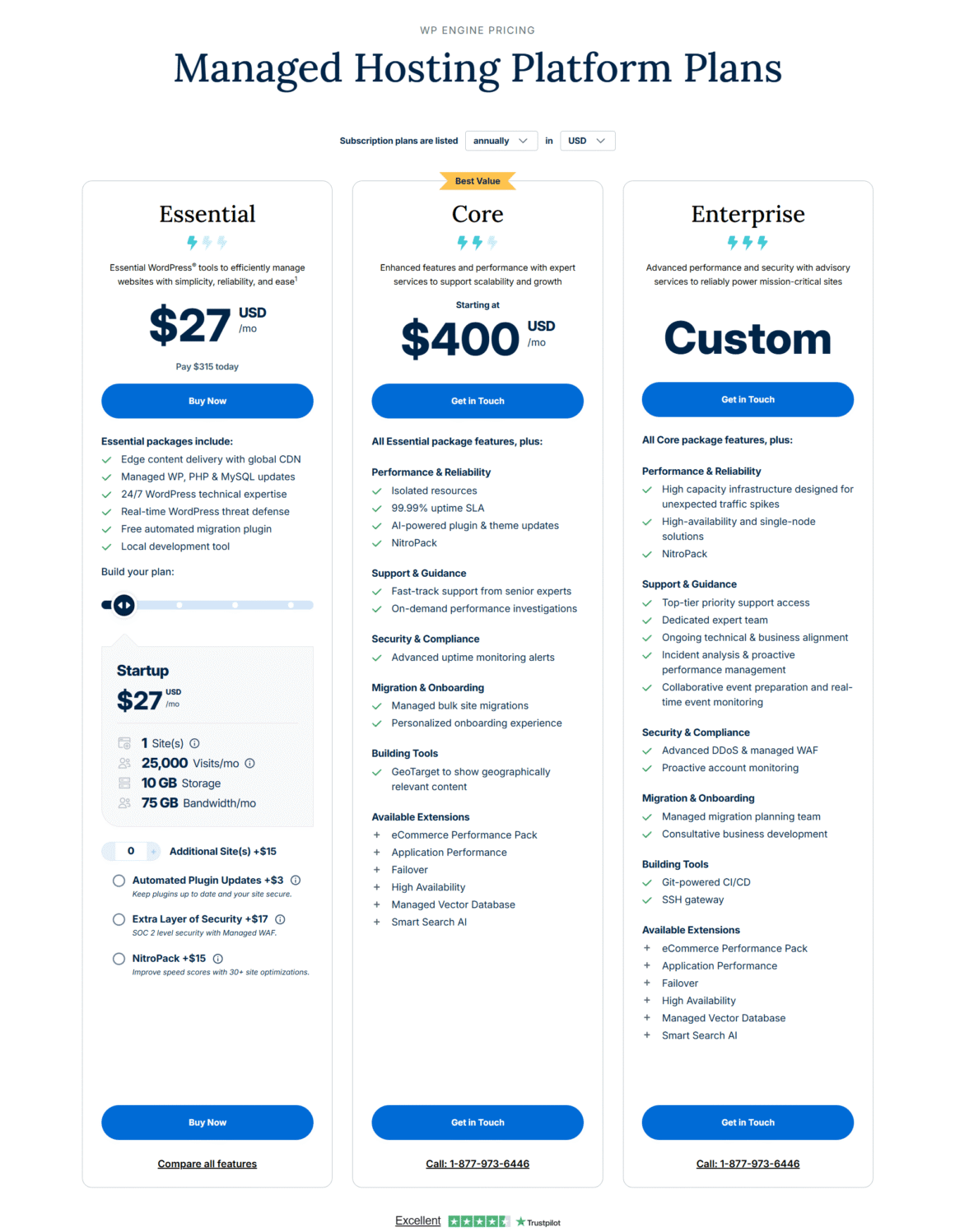
Note: Prices are indicative. WP Engine’s pricing structure evolves; confirm current rates at wpengine.com. Custom enterprise and agency pricing is available.
The Cost of Downtime: A Real Calculation
For a WooCommerce store generating $800,000 in annual revenue, average hourly revenue is approximately $91/hour. A single 2-hour outage during peak trading — the kind that shared hosting experiences during traffic spikes — represents roughly $182 in lost revenue in the most conservative scenario. Add brand damage, customer trust erosion, and potential SLA penalties to clients, and the calculation shifts sharply.
WP Engine’s Growth plan at $115/month represents $1,380/year. A comparable shared hosting arrangement might run $120–$240/year. The $1,140 premium is covered by preventing fewer than one 13-hour outage per year—or, at the revenue figure above, roughly 12.5 hours of availability. Given that shared hosting providers routinely experience multi-hour outages during high-demand periods, this premium is not a luxury expenditure. It is actuarially rational.
The single most effective way to evaluate a hosting provider is to ask: “What happens to my site at 8 AM on Black Friday when a promotional email goes out to 50,000 subscribers?” On shared hosting, the honest answer is “It might crash.” On WP Engine, with EverCache absorbing the traffic spike at the edge, the answer is “nothing — it handles it.” That reliability differential is the product you are purchasing.
WP Engine vs. Kinsta: The Premium-Tier Comparison
The most relevant competitor comparison for professionals evaluating WP Engine is Kinsta, which runs on Google Cloud Platform and offers a similarly best managed WordPress hostings experience. Both providers are genuinely excellent; the decision factors are nuanced.
| Factor | WP Engine | Kinsta |
|---|---|---|
| Infrastructure Base | Proprietary + Google Cloud + AWS | Google Cloud Platform exclusively |
| Caching Technology | EverCache (proprietary) | Nginx FastCGI Cache |
| Local Dev Tool | Local WP (free, excellent) | DevKinsta (free, good) |
| Entry-Level Price (1 site) | ~$30/mo | ~$35/mo |
| Agency Multisite Plans | Strong (agency + tiers) | Competitive |
| Git Push-to-Deploy | ✓ Native | ✓ Native |
| Plugin Restrictions | Yes (disallowed list) | Yes (similar list) |
| Support Quality | Very High (24/7 WP experts) | High (24/7 WP experts) |
For most agencies, the choice between WP Engine and Kinsta comes down to developer tooling preference and existing workflow integration. WP Engine’s Local WP application has a slight edge in maturity and ecosystem depth. Kinsta’s Google Cloud-native architecture appeals to teams deeply invested in GCP’s tooling. Neither choice is wrong.
Both are premium platforms, but WP Engine stands out for agency workflows and Local WP integration. 👉 View latest offers on WP Engine
Pros & Cons
Strengths
- EverCache performance: Sub-100ms TTFB on cached pages is consistent and reliable across plan tiers.
- Global Edge Security: Cloudflare enterprise CDN and WAF included — a standalone value worth $200+/month.
- PHP 8.4 + JIT: Latest runtime support ensures maximum application performance without manual server configuration.
- One-click staging: Production-identical staging environments remove the risk from every deployment.
- Local WP integration: Industry-leading local dev tool with seamless push/pull to live environments.
- Automated backups: Daily automated backups with 60-day retention and one-click restores.
- 24/7 WordPress expert support: Staffed by engineers who understand WordPress at a code level.
- Security posture: Isolated containerized environments, proactive threat response, free SSL management.
- 99.99% uptime SLA: Contractually backed, with real infrastructure to support it.
Limitations
- Premium pricing: Entry price is 5–10x higher than shared hosting; it is not viable for hobbyists or low-revenue sites.
- Plugin restrictions: Disallowed plugin list can create friction when migrating complex existing sites.
- No email hosting: Email is not included; agencies must budget for a separate provider such as Google Workspace or Zoho.
- Visit limit overages: Monthly traffic caps on lower plans can trigger unexpected costs during viral traffic events.
- WooCommerce on entry plan: High-volume stores may outgrow the startup plan quickly, requiring prompt tier upgrades.
- No Windows support for Local WP: Some enterprise IT environments restrict macOS/Linux tooling.
WP Engine vs. Cheap Shared Hosting: The Performance Gap
For completeness, here is a direct technical comparison against a representative shared hosting environment (providers in the $3–$15/month category, such as Bluehost shared, HostGator shared, or GoDaddy Economy):
| Metric / Feature | WP Engine (Managed) | Shared Hosting ($3–$15/mo) |
|---|---|---|
| Average TTFB (cached) | 50–120ms | 400–1,200ms |
| Average TTFB (uncached) | 150–350ms | 800–3,500 ms |
| Black Friday traffic spike | Handled via EverCache + CDN | Likely throttled or crashed |
| Resource isolation | Full containerization | Shared pool, noisy neighbours |
| PHP version control | PHP 8.4 with JIT, instant switch | Often 7.4–8.1, limited control |
| Staging environment | One-click, production-identical | Manual, no native tooling |
| Security & WAF | Enterprise Cloudflare WAF | Basic, plugin-dependent |
| Automated backups | Daily, 60-day retention | Weekly or add-on cost |
| Support quality | WordPress engineers, 24/7 | Generalist tier-1, variable |
| Uptime SLA | 99.99% | 99.9% (8+ hours/year downtime) |
The latency numbers are not hypothetical. Third-party testing tools such as GTmetrix, WebPageTest, Bluehost Review and Pingdom consistently show managed WordPress hosting delivering 3–8x better TTFB than shared environments on comparable WordPress configurations. The difference in server-side execution time — the portion WP Engine controls directly — compounds with every database query, every plugin hook, and every uncached request.
Who Is This For? (And Who Isn’t It For?)
WP Engine is the Right Choice For
- Web design agencies managing 3+ client WordPress sites
- WooCommerce stores generating $5,000+/month in revenue
- Enterprise WordPress deployments with 50,000+ monthly visits
- Businesses where site downtime has direct revenue impact
- Development teams that want Git-based deployment workflows
- Marketing teams running high-traffic campaigns or product launches
- Any site where Core Web Vitals scores directly affect SEO WordPress Google Search Optimization
- Clients in regulated industries where security posture matters
WP Engine is NOT the Right Choice For
- Personal blogs with under 10,000 monthly visitors
- WordPress sites generating under $500/month in revenue
- Developers building non-WordPress applications
- Sites heavily dependent on disallowed plugins (verify before migrating)
- Teams with a dedicated server admin who prefer bare-metal control
- Projects with strict budgets below $30/
Final Verdict
WP Engine in 2026 is precisely what it has always been, refined and reinforced: a purpose-built managed WordPress hosting platform designed for professionals who charge for results, not just services. Its EverCache architecture delivers TTFB performance that shared hosting cannot touch. Its Global Edge Security integration provides enterprise-grade DDoS protection and CDN acceleration. Its developer tooling—Local WP, Git integration, and one-click staging—is the most coherent WordPress development workflow available from a hosting provider.
The price is real. At $30–$115/month for standard plans, WP Engine represents a meaningful operational budget line. But for any agency or e-commerce operator performing an honest cost-benefit analysis—factoring in engineer time saved, downtime prevented, security incidents avoided, and client confidence maintained—the ROI case is not ambiguous. It closes decisively in WP Engine’s favor.
Recommended for agencies, e-commerce operators, and enterprise WordPress teams. The premium price is justified by infrastructure quality, developer tooling, and support depth that no shared hosting provider can match. For clients whose performance and availability have business consequences, WP Engine is not the expensive option—it is the responsible one.
Disclosure: Some links on Themezhub are affiliate links. We may earn a commission if you make a purchase through them.