“Disclosure: Some of the links in this review are affiliate links. If you purchase through them, we may earn a commission at no extra cost to you.”
Every few months, a new wave of opinion pieces proclaims that legacy page builders are finished — too heavy, too opinionated, too dependent on shortcode spaghetti to survive in a performance-obsessed era of Core Web Vitals, edge delivery, and instant-load expectations.
Those arguments had merit in 2019. They don’t hold in 2026.
After years of architectural overhauls, a ground-up rewrite in Divi 5.0, and the aggressive integration of AI-native tooling, Elegant Themes has transformed Divi from a beloved-but-bloated legacy builder into one of the most commercially productive frameworks available to professional WordPress developers today.
At Themezhub, our ongoing evaluation of professional WordPress frameworks consistently positions Divi’s 2026 infrastructure as a benchmark for commercial agency productivity—not because it’s the newest tool on the market, but because it has evolved into a complete, self-sustaining business system for studios managing high-ticket client relationships.
This is not a fanboy endorsement. It’s an evidence-based breakdown of why tens of thousands of agencies and freelance designers are doubling down on Divi rather than jumping ship.
Let’s go through the five reasons that make Divi the best WordPress page builder for client sites in 2026.
The 5 Reasons: A Deep Dive
1. The Divi 5.0 Foundation: The Performance Leap That Changed Everything
The most common technical grievance leveled at classic Divi was its shortcode dependency model. Every layout element was serialized as a WordPress shortcode, a system that created unpredictable rendering overhead, slow backend parsing, and deeply entangled content that was nearly impossible to migrate cleanly. It was, in essence, technical debt baked into every page saved.
Divi 5.0 eliminated this entirely.
The Divi 5.0 architecture was a complete rewrite from the ground up. Shortcode dependencies were removed and replaced with a native, structured data model that stores layout information independently of rendered output. The builder no longer injects processing logic at render time—layouts are pre-resolved, outputting clean HTML with minimal inline overhead.
The performance results are measurable and significant:
Interaction to Next Paint (INP)—the metric Google now weights most heavily in its Core Web Vitals scoring—is where Divi 5.0 delivers its most compelling upgrade. The previous builder’s reliance on legacy jQuery-heavy event handlers created pronounced input delay. The 5.0 rewrite replaces this with a modern, lightweight event architecture that routinely achieves INP scores below 100ms on properly configured hosting environments, comfortably within Google’s “Good” threshold.
Largest Contentful Paint (LCP) improvements are equally substantial. Because Divi 5.0 no longer loads redundant module libraries for elements not present on a given page, initial payload sizes are dramatically reduced. Combined with native Critical CSS generation and improved asset deferral, agencies are reporting LCP benchmarks that satisfy enterprise-grade Core Web Vitals thresholds without the need for extensive third-party performance plugins.
For agencies running the Divi Performance Optimization workflow — combining 5.0’s native asset handling with a modern CDN stack — achieving PageSpeed scores in the 90s on mobile is no longer an exceptional result. It is the expected baseline.
The Elegant Themes Divi 5.0 performance review data that has emerged across independent benchmarking platforms in 2026 confirms what the architecture promised: this is a builder that has genuinely closed the performance gap with block-based alternatives and, in real-world production environments with complex layouts, often outperforms them on Acing Interaction to Next Paint (INP) metrics due to its more disciplined module-loading model.
Bottom line for agencies: You can sell Divi-built sites to performance-conscious enterprise clients without asterisks or apologies. The technical debt is gone.
2. The Lifetime Value Architecture: The Agency Financial Hack That Compounds Over Time
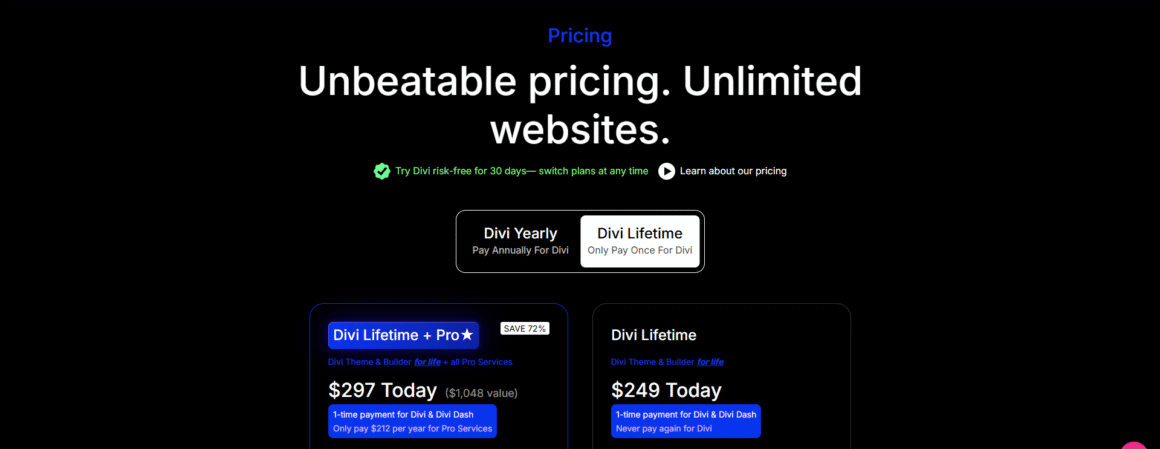
Agency economics are built on margin management. Every recurring subscription in your toolset is a fixed cost that scales against your revenue—but not always in your favor. This is where the Divi Theme Lifetime Access value for agencies becomes one of the most structurally undervalued advantages in professional WordPress development.
Elegant Themes offers a lifetime access license at a one-time flat fee. This is not a common model in the premium plugin/theme market. Most competitors—including Elementor Pro—operate on annual subscription renewals that increase in cost as team seats grow and as the vendor adjusts their pricing tiers.
Let’s model this over a ten-year agency horizon:
| Metric | Divi Lifetime Access | Elementor Pro (Annual, Agency Tier) |
| Year 1 Cost | ~$249 (one-time) | ~$399–$599/year |
| Year 3 Cumulative | $249 | ~$1,200–$1,800 |
| Year 5 Cumulative | $249 | ~$2,000–$3,000 |
| Year 10 Cumulative | $249 | ~$4,000–$6,000+ |
| Cost Per New Client Site Added | $0 | Dependent on tier limits |
Secure your Elegant Themes Lifetime Access before pricing tiers change.
The differential is stark. And critically, the Lifetime Access model includes unlimited website usage, meaning a studio onboarding its 50th client pays exactly the same license cost as one building its first site.
This is the financial leverage point that makes Divi a genuine business tool rather than just a design preference. As your portfolio scales, your tooling cost stays fixed while your revenue scales linearly. Competing subscription models invert this relationship — the larger your client base, the higher your operational overhead.
Beyond the direct cost savings, the Lifetime Access model eliminates renewal anxiety—the operational risk of a key tooling subscription lapsing during an active client project. Studios that have experienced a payment failure on an Elementor or WPBakery subscription during a live deployment understand this risk viscerally. With a lifetime license, it simply doesn’t exist.
For freelancers and studio owners evaluating the Divi ecosystem vs. Elementor Pro for freelancers, the financial calculus at the three-year mark is no longer close. The Divi lifetime license pays for itself typically within the first 12–18 months, after which every client site built is pure tooling margin.
Bottom line for agencies: The Divi lifetime model is not just a pricing preference. It is a structural business advantage that compounds in your favor over every year your studio operates.
3. Deep Generative UI Integration: The Divi AI Workflow That Rewires Your Production Pipeline
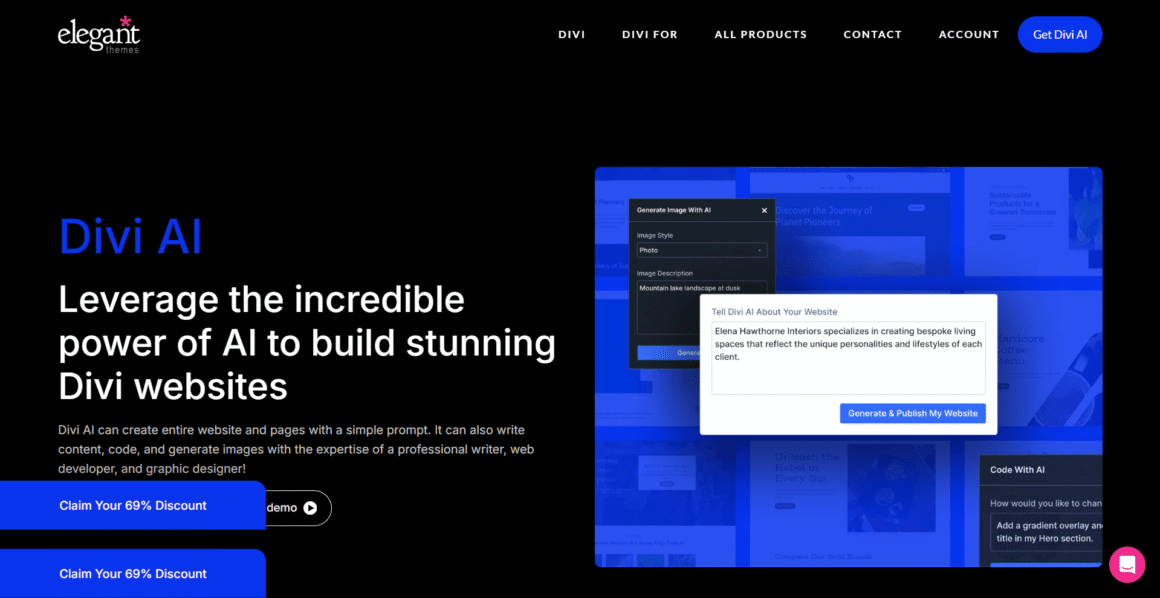
The maturation of Divi AI Layout Generation for high-ticket web design in 2026 represents one of the most significant workflow shifts available to professional WordPress studios. Unlike surface-level AI integrations that append a chatbot to an existing interface, Divi AI is architecturally embedded into the builder itself — and the distinction matters enormously in production.
Here is what Divi AI actually does inside a live project environment:
Complete Layout Wireframing from Prompt: Designers can initiate a full section or page wireframe from a natural language brief — “Generate a hero section for a B2B SaaS company with a left-aligned headline, supporting subtext, a CTA button, and a product screenshot placeholder” — and receive a structured, editable layout directly within the Divi Visual Builder. This is not a template insertion. It is a contextually generated layout built to the spec of the prompt.
Localized Copy Generation: Divi AI generates page-specific body copy, headlines, and microcopy natively within the module context. When you’re inside a text module for a law firm’s services page, the AI generates content aware of that module’s position in the page hierarchy, not generic filler text. For agencies managing rapid client onboarding, this collapses first-draft content production time by 60–70%.
Custom Imagery Generation: The AI integration includes image generation capabilities embedded within the media workflow, allowing designers to generate placeholder and final-use imagery contextually without leaving the builder environment and without managing separate Midjourney or DALL-E workflows.
Native CSS Adjustments: Perhaps the most technically powerful feature for developers: Divi AI can accept natural language. CSS instructions—”Increase the section padding on mobile to 40px and reduce the heading font-weight to 500″—and apply these changes as clean, scoped CSS without requiring manual entry into the custom CSS panel. This dramatically accelerates responsive refinement passes.
The combined effect of these capabilities on a professional production workflow is not incremental. Studios utilizing the full Divi AI workflow for client onboarding—from layout generation through copy drafting to responsive CSS refinement—are reporting project delivery timelines compressed by 30–40% on comparable briefs versus non-AI-assisted workflows.
For high-ticket web design at the $5,000–$25,000 project level, this margin expansion is transformational. The same studio delivering the same quality of work in 60% of the time is effectively operating at dramatically higher hourly revenue without increasing capacity.
Bottom line for agencies: Divi AI is not a novelty feature. In 2026, it is a production multiplier that directly expands studio margin on every project it touches.
4. Bulletproof Client Handovers: The Divi Role Editor and the End of “The Client Broke the Site” Problem
Every agency that has operated beyond its first dozen client relationships has a version of this story: a client with WordPress admin access decides—on a Saturday evening, naturally—to “update the homepage a little.” By Sunday morning, the global font is Comic Sans, the brand color is gone, and the contact form is missing.
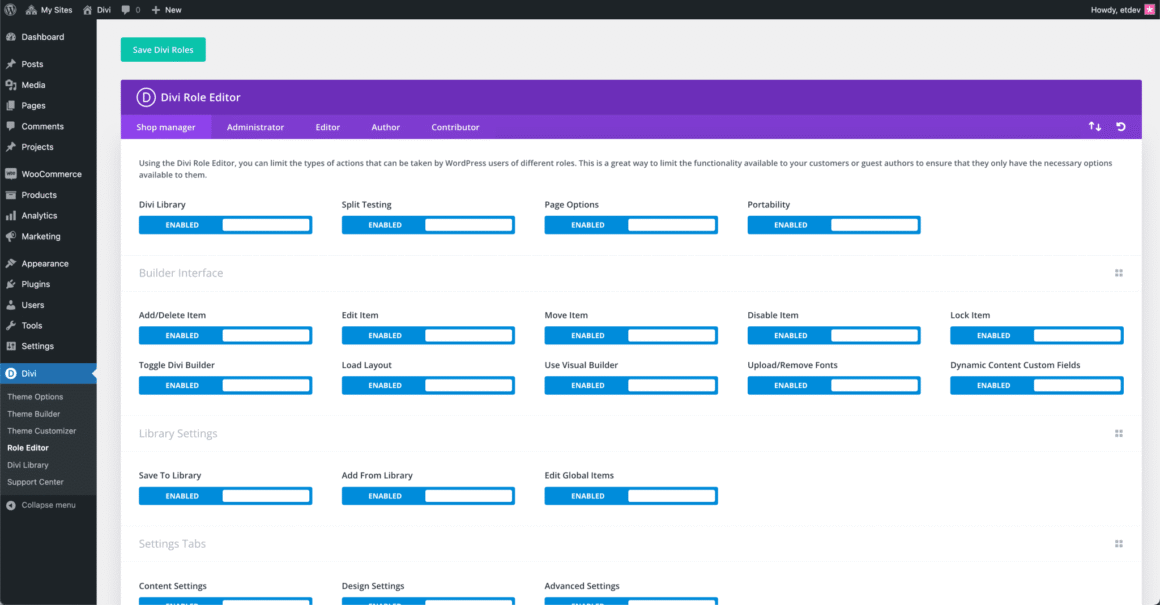
This is not a hypothetical. It is the defining operational pain point of professional WordPress development. And managing complex client permissions in Divi Role Editor is, in 2026, Divi’s most underappreciated enterprise-grade feature.
The Divi Role Editor provides granular, module-level access control across four critical permission dimensions:
Global Style Isolation: Agencies can completely lock the Global Colors palette, Global Fonts configuration, and Divi Theme Options panel from client-facing accounts. Clients can edit page content within permitted modules without ever having access to the design system that underpins the entire site. A client cannot change the brand’s primary color. They cannot select a different heading typeface. The design language is locked at the system level.
Layout Protection: Specific page sections, global templates, and footer/header builders can be restricted from client editing permissions. A client can update the body copy in their blog post editor. They cannot restructure the homepage hero layout or delete the sticky navigation module.
Theme Customizer Restrictions: The WordPress Customizer—a notorious vector for accidental design damage—can be selectively restricted or fully hidden from client accounts. Agencies retain full customer access; clients operate within a curated, controlled interface.
Page Builder Access Tiers: The Role Editor allows agencies to expose a simplified, module-limited version of the Visual Builder to clients who need light editing capabilities while completely restricting access to the Wireframe View, global module library, and dynamic content settings that could destabilize complex layouts.
The operational implication for agency maintenance security is significant: client accounts can be handed over with genuine confidence, not cautious optimism. Retainer contracts for maintenance and support become structurally easier to price and defend when the risk surface of client-initiated damage is contractually and technically limited.
This level of access control is not replicated at the same depth in Elementor’s standard permission model, and block-based builders provide no equivalent native capability whatsoever.
Bottom line for agencies: The Role Editor transforms client handovers from an anxiety event into a controlled, documented process. It is a retention tool as much as a security tool — clients who feel in control within their permitted scope are clients who renew maintenance contracts.
5. An Unparalleled Ecosystem and Marketplace: The Infrastructure That Makes Complex Builds Commercially Viable
No builder exists in isolation. The commercial viability of a WordPress framework for professional agency work is measured not just by its native capabilities but by the quality, depth, and reliability of its surrounding ecosystem. This is where Divi’s decade-plus market presence creates a structural moat that no newer entrant can replicate quickly.
Third-Party Plugin Infrastructure:
The Divi ecosystem includes a mature network of dedicated extension developers who have built highly specialized tooling on top of the builder’s API. Key players include:
- Divi Engine—specializing in creating dynamic content layouts with Divi Engine, including advanced post loop modules, custom field rendering, and database-driven content displays that make custom CPT-based builds commercially viable without bespoke development. Their Divi Mega Menu, Divi Projects, and Divi Extended suites are production-grade tools used across thousands of commercial agencies.
- Divi Supreme — delivering a library of 60+ premium modules covering advanced animation systems, conditional content visibility, custom post type layouts, and performance-optimized media handling. These modules close functional gaps between Divi’s native feature set and fully custom-coded solutions.
- DiviFlash, Divi Booster, and Pee Aye Creative — providing targeted utility expansions across WooCommerce styling, sticky elements, advanced typography controls, and code management tools.
WooCommerce at Scale:
Building custom WooCommerce stores with the Divi theme is a genuine commercial use case supported by a deep ecosystem of purpose-built extensions. The combination of Divi’s WooCommerce module suite, Divi Engine’s WooCommerce extensions, and dedicated child theme frameworks allows agencies to deliver fully designed, custom-shopped e-commerce experiences—product grid customization, cart page design, and checkout flow layout—without building WooCommerce template overrides from scratch.
For agencies in the $3,000–$15,000 WooCommerce build bracket, this ecosystem means the difference between a commercially viable project and an over-engineered custom development engagement.
Pre-Built Child Theme Marketplace:
The Divi child theme market — with active providers including Divi Life, Aspen Grove Studios, and Divi Space — provides a library of hundreds of professionally designed, agency-tested starting points. These are not generic templates. They are structured starting frameworks with pre-configured global styles, page layout libraries, and WooCommerce integration — enabling agencies to deliver branded, custom-feeling builds in compressed timeframes.
This Themezhub Guide to Professional WordPress Frameworks perspective is consistent across the practitioners we evaluate: the depth of Divi’s third-party ecosystem is the single most underweighted factor in builder comparisons. Competitors are evaluated on their native feature set. Divi should be evaluated on its total system capability — native features plus ecosystem depth.
Bottom line for agencies: The Divi ecosystem means you are never building alone. For complex builds—dynamic content, WooCommerce, custom post types, and membership sites—the infrastructure exists to deliver commercially without proportional custom development investment.
The Agency Framework Scorecard: Divi 5.0 vs Elementor Pro vs Block-Based Builders
| Evaluation Criteria | Divi 5.0 | Elementor Pro | Block-Based Builders (FSE) |
| Custom Client Permissions | ✅ Deep — Role Editor with module-level granularity | ⚠️ Limited — basic user role mapping only | ❌ Non-native — requires third-party plugins |
| Cost Predictability (10-Year) | ✅ Excellent — one-time lifetime license, fixed cost | ❌ Poor — annual subscription, cost scales with team/sites | ✅ Good — core is free; costs arise from plugins |
| Real-World INP Performance | ✅ Strong — 5.0 architecture achieves sub-100ms INP | ⚠️ Moderate — ongoing optimisation challenges at scale | ✅ Strong — native block rendering advantage |
| LCP / Core Web Vitals | ✅ Excellent post-5.0 with native Critical CSS | ⚠️ Moderate — requires external performance plugins | ✅ Strong natively |
| Built-in AI Power | ✅ Full — layout, copy, imagery, CSS via Divi AI | ⚠️ Partial — AI Copilot for text/CSS only | ❌ Minimal — experimental only |
| WooCommerce Build Depth | ✅ Excellent — deep native + ecosystem support | ✅ Good — Elementor WooCommerce Builder | ⚠️ Basic — limited styling control without dev work |
| Dynamic Content / CPT Support | ✅ Strong — native + Divi Engine ecosystem | ✅ Strong — native dynamic tags | ⚠️ Moderate — requires ACF integration and custom blocks |
| Learning Curve for New Hires | ✅ Low — mature, well-documented UI | ✅ Low — similar visual UX | ⚠️ High — FSE requires deeper WordPress knowledge |
| Ecosystem Maturity | ✅ Excellent — 10+ years, deep third-party library | ✅ Good — strong but narrower ecosystem | ⚠️ Developing — ecosystem is growing but immature |
| Lifetime License Availability | ✅ Yes | ❌ No | ✅ N/A (open source) |
| Client Handover Safety | ✅ High — Role Editor protects design system | ⚠️ Medium — limited native protection | ❌ Low — no native permission control |
| Agency Scalability (50+ Sites) | ✅ High — fixed cost, unlimited sites | ⚠️ Medium—cost increases at scale | ✅ High — free core scales well |
Scorecard Summary: Divi 5.0 leads across the metrics that matter most for commercial agency operations: cost predictability, client permission management, AI workflow integration, and ecosystem depth. Block-based builders hold a native performance edge but lack the commercial tooling required for efficient client-site production. Elementor Pro remains a capable alternative but cannot match Divi’s financial architecture or permission depth at scale.
Conclusion: Divi in 2026 Is a Revenue Engine, Not Just a Builder
The question of why Divi is still the king of WordPress in 2026 is not answered by a single feature advantage. It’s answered by the totality of what Elegant Themes has constructed over fifteen years and — critically — what they rebuilt from scratch in Divi 5.0.
- Performance: The 5.0 architecture has resolved the technical debt that defined Divi’s legacy critique. Studios can confidently deliver sites that ace Core Web Vitals, pass enterprise performance audits, and satisfy Google’s INP standards without performance engineering gymnastics.
- Economics: The Lifetime Access model is a compounding financial advantage that becomes more valuable with every passing year of agency operation. No other major builder in its class offers this.
- AI Integration: Divi AI is a genuine production accelerator, not a marketing feature. Agencies using it are delivering higher-margin work in less time.
- Client Safety: The Role Editor solves a real, expensive, emotionally exhausting problem that every professional WordPress agency has experienced. It enables scalable client relationships with reduced operational risk.
- Ecosystem Depth: The Divi ecosystem allows agencies to take on complex, high-value builds—WooCommerce stores, dynamic content sites, and membership platforms—and deliver them commercially without proportional custom development investment.
For the WordPress agency, the freelance designer managing a portfolio of high-paying contracts, and the studio owner building toward scale, Divi is not a legacy choice in 2026. It is a strategic one.
The builders who dismissed it during its bloated-shortcode era are now benchmarking against what it has become. The agencies who stayed — or who are returning — are building their most profitable client portfolios on it.
Ready to scale your agency? Get Started with Divi Today